

Browserfax: Send Fax Online Free from Chrome | Secure IRS Faxing
Cara Install Ekstensi Chrome
- Klik tombol "Add to Chrome" di atas.
- Anda akan diarahkan ke Chrome Web Store.
- Klik "Add to Chrome" pada halaman ekstensi.
- Konfirmasi dengan klik "Add Extension" pada popup.
- Ekstensi akan otomatis terpasang dan ikon muncul di toolbar.
- Klik ikon ekstensi di toolbar untuk mulai menggunakan.
Screenshot
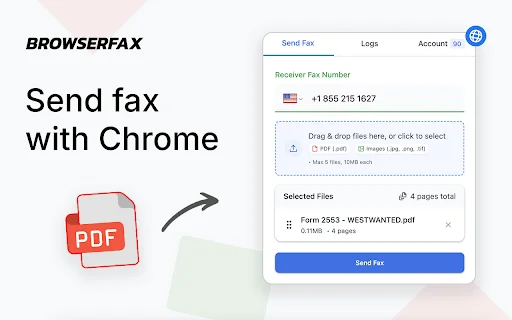
Are you tired of hunting for a local print shop just to send a single document? For busy professionals and individuals across the United States, Browserfax offers a seamless, modern solution that transforms your Google Chrome browser into a powerful, secure fax machine. Say goodbye to outdated hardware, monthly subscriptions, and the hassle of physical phone lines.
Whether you are filing tax forms with the IRS, managing business contracts, or sending medical records, Browserfax ensures your documents arrive safely and quickly. By leveraging end-to-end encryption and a user-friendly interface, we provide a reliable way to handle your most sensitive paperwork directly from your computer, giving you peace of mind and saving you precious time.
Key Features
- Send faxes directly from your Chrome browser without external websites.
- Get 20 free fax pages upon signing in with your Google account.
- HIPAA-compliant and secure, offering end-to-end encryption for all documents.
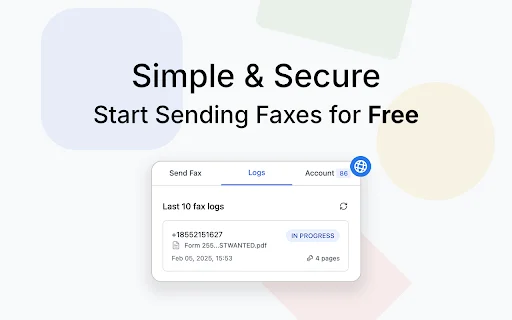
- Real-time status tracking: Know exactly when your fax is queued, sent, or received.
- Supports multiple file formats including PDF, JPG, PNG, and TIFF.
- Global reach: Send faxes to over 40 countries, including the U.S. and Canada.
- Simple, clean interface designed for maximum productivity and ease of use.
- Perfect for government agencies, tax filings (like Form 2553), and legal paperwork.
How to Use
- Install the Browserfax extension and sign in with your Google account to claim your 20 free pages.
- Enter the recipient’s fax number into the extension interface.
- Upload your document—PDF is recommended for the best quality and formatting.
- Click “Send Fax” and track the progress of your document in real-time until it is successfully delivered.
FAQ
Is it really free to send a fax with Browserfax?
Yes, every user receives 20 free fax pages upon signing in with their Google account. No credit card or subscription is required to get started.
Is Browserfax secure for sending IRS tax forms?
Absolutely. We use end-to-end encryption to ensure that sensitive documents, including IRS tax forms, are transmitted securely and remain private throughout the process.
Do I need a fax machine or phone line?
No. Browserfax eliminates the need for hardware. You only need your computer and a Chrome browser to send faxes anywhere in the world.
Which file formats are supported?
You can easily upload and send PDF, JPG, PNG, and TIFF files directly from your computer.
How do I know if my fax was sent successfully?
Browserfax provides real-time status updates, so you can track your fax from “Queued” to “Completed” to ensure it reaches its destination.
Experience the future of document transmission. Stop wasting time at physical fax shops and start managing your paperwork from your browser. Download Browserfax today and send your first fax in seconds!
Users highly recommend Browserfax for its convenience, ease of use, and strong focus on security, making it a reliable alternative to traditional fax machines.
Kelebihan
- Convenient and easy to use
- No need for physical fax shops
- HIPAA-compliant and secure
- Straightforward process from Chrome
Kekurangan
- No specific downsides reported by users
Ulasan Pengguna
Very useful, I had to send signed paperwork while traveling and Browserfax saved me from searching for a local print or fax shop. Everything was handled directly from Chrome and the process felt straightforward from start to finish.
Definitely more convenient than searching for local fax shops.
Uploading my files was easy, and the HIPAA/security compliance gives extra peace of mind when sending sensitive information.
| ID Ekstensi | cjegchjffhcimphmkcpalmcdphhcnjha |
|---|---|
| Version | 0.0.3 |
| Size | 1.6 MB |
| Developer | https://browserfax.com |
| Terakhir Diperbarui | |
| Tanggal Rilis | |
| Jumlah Pengguna | 2.000++ |
| Jumlah Ulasan | 28 |
| Chrome Store Ranking | #20659 |
| Category | Productivity |
| Tipe | Paid |
SAEPAM ডাউনলোড করুন – PAMSIMAS ও PAM বিলিং ম্যানেজমেন্ট সফটওয়্যার
softwaresae

Grammar Check – AI Writing ডাউনলোড করুন – সেরা গ্রামার চেকার
BrightByte Lab

Barcode Maker ডাউনলোড করুন – সেরা QR এবং বারকোড জেনারেটর
https://barcodemaker.app/

HTML Elements Screenshot ডাউনলোড করুন – ওয়েব এলিমেন্ট ক্যাপচার টুল
Sevina

NexusMods Bypass: Speed Up Your Mod Downloads – Chrome Extension
thomasthanos28
Calculator PanecalST Plus ডাউনলোড করুন – সেরা ক্যালকুলেটর অ্যাপ
Appsys