

Download SCU Schedule Helper – Optimize Your Santa Clara University Schedule
Cara Install Ekstensi Chrome
- Klik tombol "Add to Chrome" di atas.
- Anda akan diarahkan ke Chrome Web Store.
- Klik "Add to Chrome" pada halaman ekstensi.
- Konfirmasi dengan klik "Add Extension" pada popup.
- Ekstensi akan otomatis terpasang dan ikon muncul di toolbar.
- Klik ikon ekstensi di toolbar untuk mulai menggunakan.
Screenshot
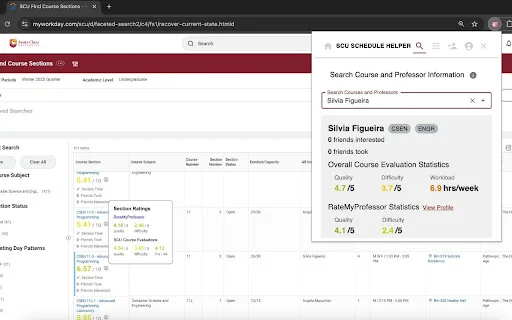
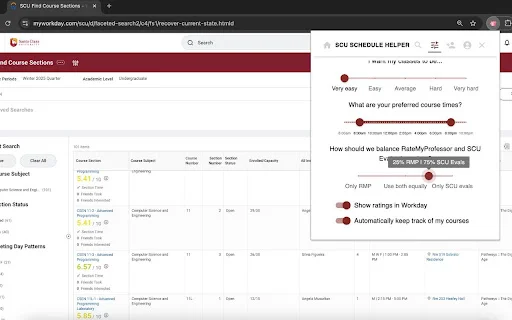
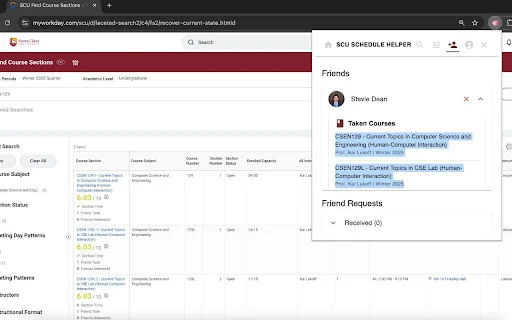
Are you a Santa Clara University student tired of juggling multiple tabs just to figure out which professor is the best or when your next class is? Planning your semester should be a seamless experience, not a source of stress. The SCU Schedule Helper is the ultimate browser extension designed specifically for SCU students to streamline the registration process and help you build the perfect academic schedule with confidence.
By integrating directly into the university’s course registration portal, this powerful tool pulls real-time data from Course Evals and RateMyProfessor, providing you with instant insights at your fingertips. Whether you are looking to balance your workload or ensure your friends are in the same sections, this extension transforms your registration experience from a manual chore into an efficient, data-driven strategy.
Key Features
- Integrated professor and course ratings directly on the SCU registration website.
- Seamlessly sync your finalized course schedule to Google Calendar with one click.
- Social features allowing you to view and coordinate schedules with friends.
- Powerful extension popup to search for courses and professors on the fly.
- Personalized course preference management within the extension interface.
- Ability to add and manage your academic network of friends easily.
- Consolidated data sources to save you time and prevent browser tab clutter.
- Lightweight and user-friendly design tailored for the SCU student experience.
How to Use
- Install the SCU Schedule Helper extension from the Chrome Web Store and pin it to your toolbar.
- Log in to your SCU student portal and navigate to the course registration page.
- View the embedded ratings and course details displayed automatically beside each class entry.
- Use the extension popup to customize your preferences, manage your friend list, or export your schedule to Google Calendar.
FAQ
Is SCU Schedule Helper free to use?
Yes, the extension is free for all Santa Clara University students to help optimize their academic planning.
Does this extension work with the official SCU registration site?
Yes, it is designed to integrate directly into the university’s course registration portal to provide real-time data.
Can I sync my classes to Google Calendar?
Absolutely! You can add your selected courses directly to your Google Calendar through the extension interface.
What should I do if I encounter a sign-in error?
If you face a “request is invalid” error, please try signing in again later or reach out to the developer via the official support link.
Does this tool show reviews from other students?
Yes, the extension aggregates data from SCU’s Course Eval and RateMyProfessor to give you a comprehensive overview of your instructors.
Don’t let the registration process overwhelm you. Join over a thousand SCU students who have already upgraded their academic workflow. Install the SCU Schedule Helper today and take control of your semester planning!
Users highly value the extension for its time-saving integration of course ratings and calendar sync, though some experience occasional sign-in authentication issues.
Kelebihan
- Seamless integration with SCU registration portal
- Convenient Google Calendar synchronization
- Aggregates professor ratings and course data in one place
- Helps simplify complex class scheduling
Kekurangan
- Occasional authentication or sign-in errors
- Requires manual troubleshooting for some connection issues
Ulasan Pengguna
it works but im getting this error when trying to sign in: Access blocked: SCU Schedule Helper’s request is invalid.
Nice extension for adding classes to google calendar
The SCU Schedule Helper Chrome Extension is a total game-changer for planning classes at Santa Clara University. It brilliantly combines data from SCU’s Course Eval and RateMyProfessor, saving me from countless tabs and endless comparisons.
| ID Ekstensi | feinilelhamnodbmhjhacnajbbhapdhj |
|---|---|
| Version | 2.3.7 |
| Size | 3.7 MB |
| Developer | https://scu-schedule-helper.me |
| Terakhir Diperbarui | |
| Tanggal Rilis | |
| Jumlah Pengguna | 1.000++ |
| Jumlah Ulasan | 11 |
| Chrome Store Ranking | #27306 |
| Category | Education |
| Tipe | Free |

Ukrestu Esihlabelelweni ডাউনলোড করুন – এনডেবেলে-জুলু স্তোত্রমালা
Spikkez Studios

Your Maths Buddy ডাউনলোড করুন – CA ফাউন্ডেশন গণিত প্রস্তুতি
Aman Sir (AkClasses)

RISE – কুইজ অ্যাপ ডাউনলোড করুন: খেলুন, শিখুন এবং পুরস্কার জিতুন
Taranti India

Classview ডাউনলোড করুন – গুগল ক্রোম ক্লাসরুম মনিটরিং টুল
https://ctrl-it.nz

Ehliyet Sınav Soruları 2026 ডাউনলোড করুন – ড্রাইভিং লাইসেন্স প্রস্তুতি
Ehliyet Sınav Soruları Çıkmış Sorular

Audio German Schlachter Bible ডাউনলোড করুন – সেরা জার্মান বাইবেল অ্যাপ
JaqerSoft